Welcome to NourAIsh! This guide will help you set up the app and start tracking your nutrition in minutes.
First Launch & Profile Setup
When you first open NourAIsh, you'll be guided through a quick setup process to personalize your experience.
Welcome Screen
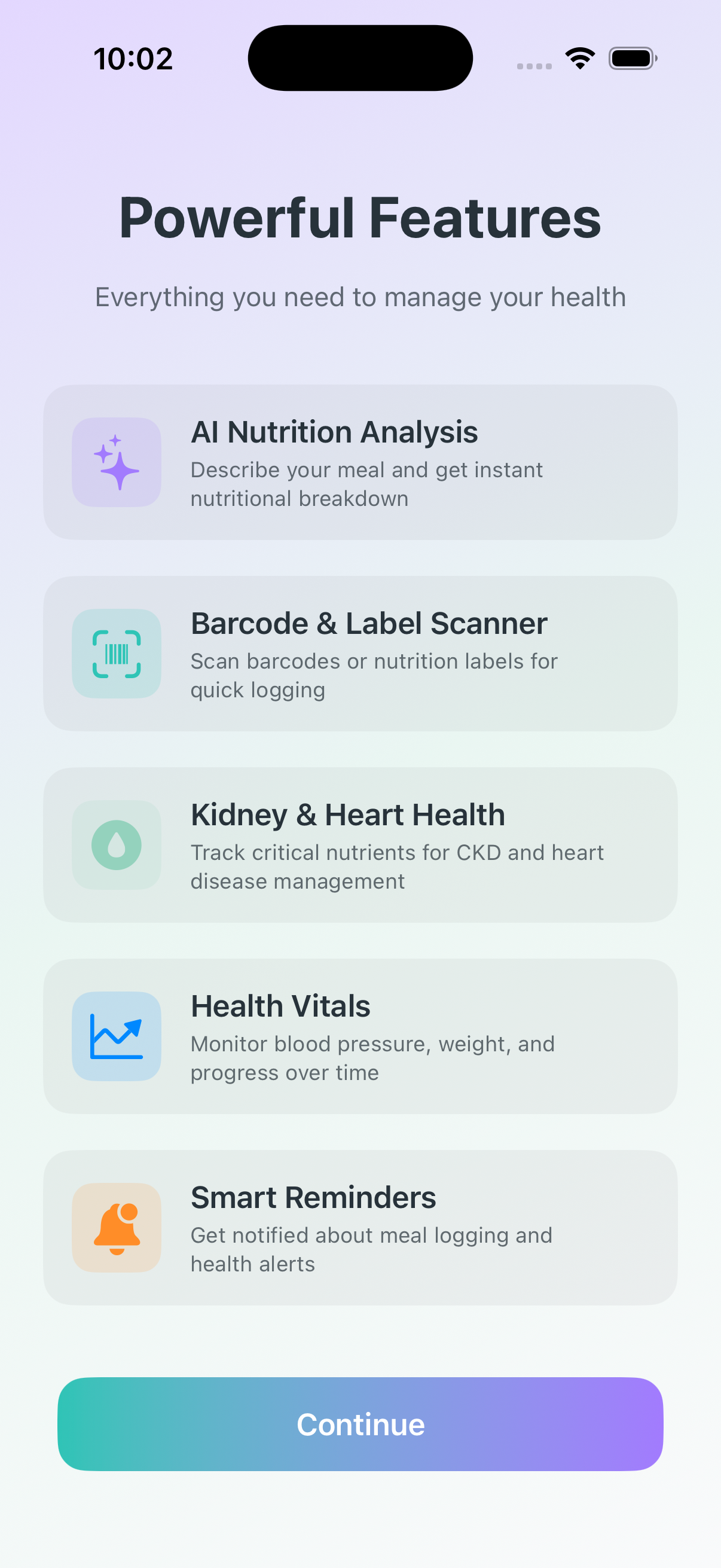
The welcome screen introduces you to NourAIsh's key features:
AI-Powered Logging - Describe meals in your own words
Comprehensive Tracking - Monitor calories, macros, and micronutrients
Health Modes - Special tracking for kidney and heart health
Recipe Management - Create and track homemade meals
Creating Your Profile
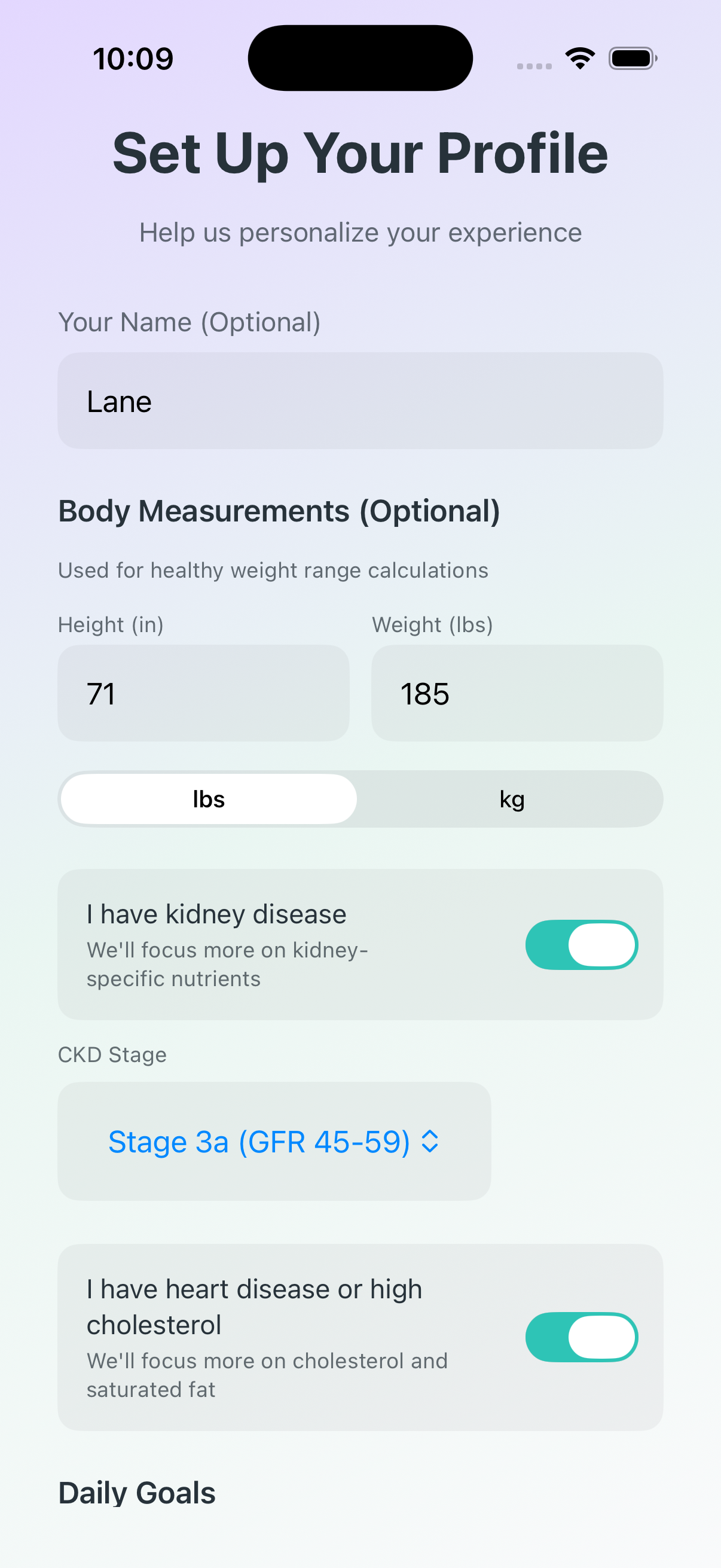
Next, you'll set up your profile with some basic information:
Name - How you'd like to be greeted
Date of Birth - For your profile
Height & Weight - Tracked alongside your nutrition data
Choosing Your Health Focus
NourAIsh offers specialized health modes to customize what nutrients are tracked and highlighted. You can enable these during setup or anytime in Settings.
General Wellness (Default)
Standard nutrition tracking for overall health. Tracks calories, macros (protein, carbs, fat), fiber, and key micronutrients. Protein is tracked as a goal to meet.
Kidney Health Mode
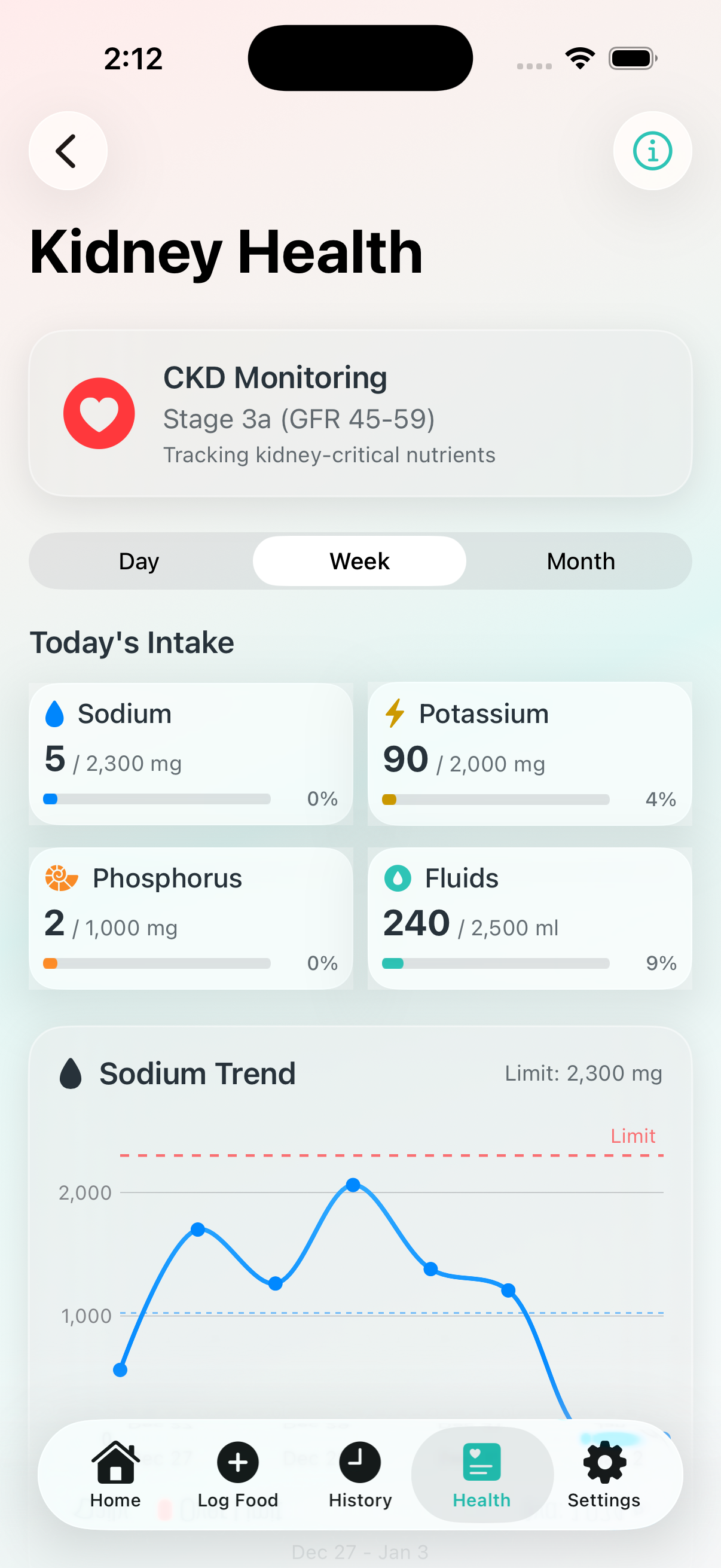
When you enable Kidney Disease in your profile, NourAIsh adapts to help you manage kidney-critical nutrients:
Sodium, Potassium, Phosphorus - Tracked as limits with warnings when approaching thresholds
Protein - Changes from a goal to a limit (important for CKD management)
Fluid Intake - Optional fluid tracking for those with restrictions
CKD Stage - Set your stage (1-5) to get appropriate default limits
Dedicated Kidney Tab - A new tab appears showing kidney-specific trends and insights
Heart Health Mode
When you enable Heart Disease in your profile, NourAIsh emphasizes heart-healthy nutrition:
Sodium - Stricter limits aligned with heart health guidelines
Saturated Fat - Tracked prominently as a limit
Cholesterol - Daily cholesterol tracking
Heart-focused insights - AI recommendations consider cardiovascular health
Tip: You can enable both Kidney and Heart modes simultaneously if you're managing both conditions. NourAIsh will track all relevant nutrients.
Note: You can change your health mode anytime in Settings > Edit Profile. Your logged data is always preserved when switching modes.
Understanding the Dashboard
The Home tab is your nutrition dashboard, showing your daily progress at a glance.
Today's Summary
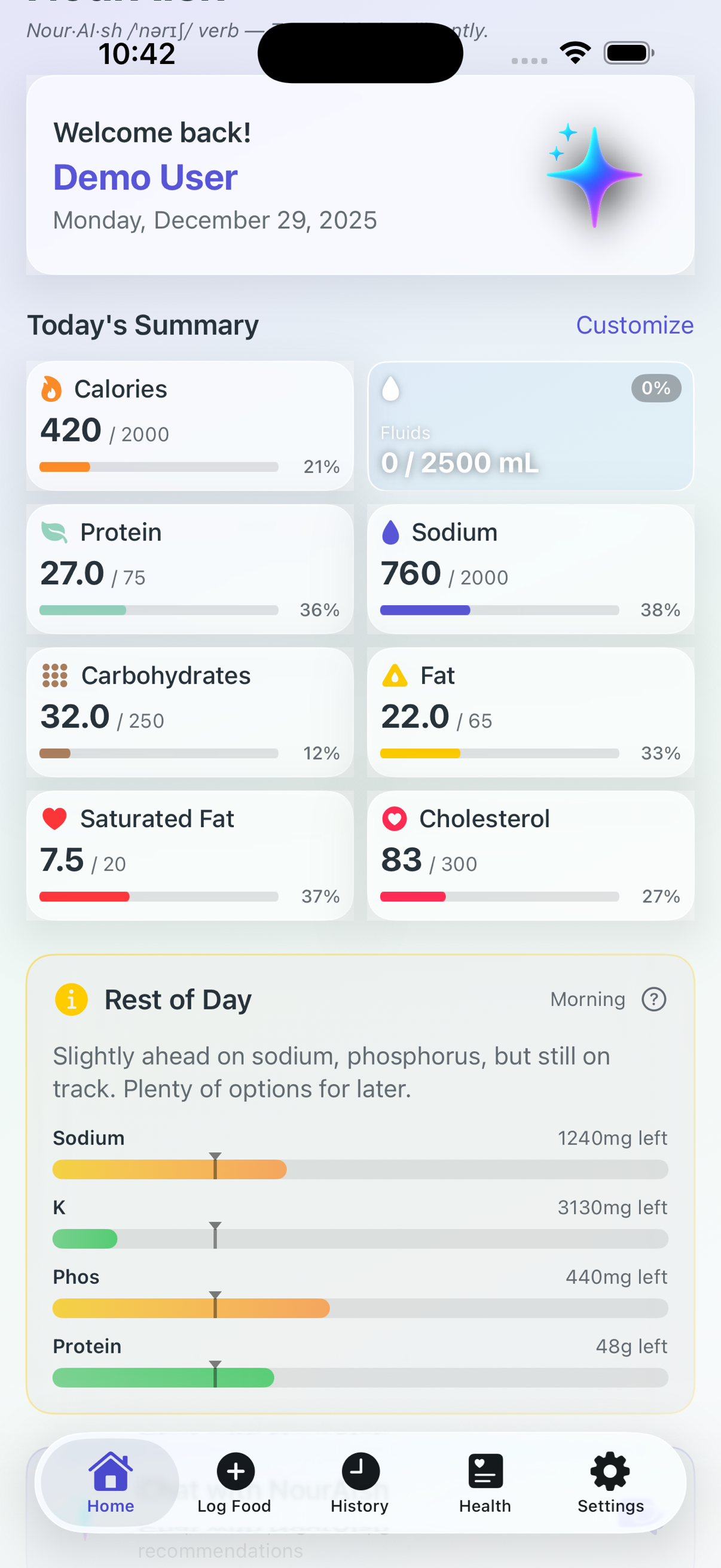
At the top of the Home tab, you'll see nutrient tiles showing your progress for today:
Nutrient Tiles - Each tile shows current intake vs. your daily target with a progress bar
Customize Button - Tap to choose which nutrients appear on your Home screen
Color-Coded Progress - Progress bars use intuitive colors: green means you're doing well, yellow appears when you're approaching your limit (70-90%), and red warns you're at or over your limit (90%+). Goal nutrients like protein and fiber always show green. If you have kidney disease enabled, protein becomes a limit and follows the green/yellow/red pattern. For heart disease, pay close attention to sodium, saturated fat, and cholesterol—these are always limits, so their colors help you stay within heart-healthy targets.
How's My Day?
This card provides AI-powered insights about your nutrition. Tap it to get a personalized summary of how your day is going nutritionally, with suggestions for what to eat next based on your remaining budget. Tap History to see past AI insights.
Rest of Day
The Rest of Day feature provides time-aware nutrition guidance. It calculates your remaining nutrient budget based on the current time of day, showing you how much of each nutrient you can still consume. This helps you make smarter meal choices—for example, if it's 6 PM and you've only used half your calorie budget, you know you have room for a hearty dinner. Tap the question mark icon on the right to see detailed information about how to read and use the Rest of Day chart.
Health Focus Card
If you have a health mode enabled (Kidney Disease or Heart Disease), a card appears showing your active focus and what nutrients are being monitored. This is a quick reminder of your health tracking priorities.
Gut Check
A daily motivational quote to keep you inspired on your nutrition journey. This changes each day to provide fresh encouragement.
Today's Entries
A chronological list of everything you've logged today. Each entry shows:
Food name and category icon
Calorie count
Time logged
Tap any entry to view details, edit, or delete it.
Recent Vitals
At the bottom of the Home tab, you'll see your most recent health measurements:
Weight - Your latest weight entry with the date recorded
Blood Pressure - Most recent reading with a status indicator (Normal, Elevated, etc.)
Last Night's Sleep - Sleep duration from HealthKit with bed and wake times
Tap any vital to log a new measurement or view your history.
Logging Your First Food
NourAIsh offers several ways to log food. Here's the quickest way to get started:
Using Chat with NourAIsh
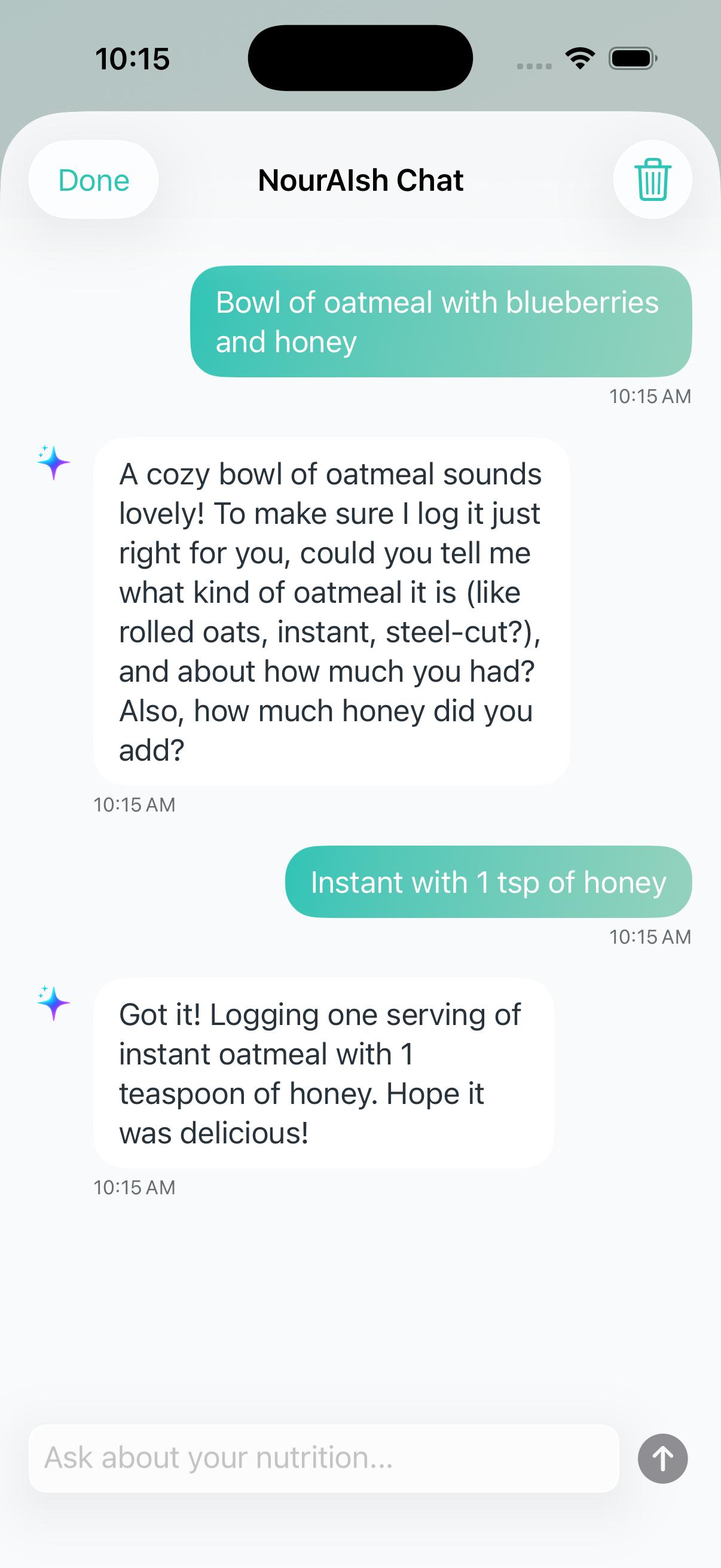
The easiest way to log food is by describing your meal in natural language:
Tap the Log Food tab at the bottom of the screen
Tap the Chat with NourAIsh card at the top
Type what you ate, like "bowl of oatmeal with blueberries and honey"
NourAIsh AI will analyze your description and log it automatically
Tip: Be specific for better accuracy! "Large banana" gives more accurate results than just "banana."
Other Ways to Log Food
From the Log Food tab, you can also:
Search Food - Search the USDA and Open Food Facts databases
Scan Barcode - Scan packaged food barcodes
Scan Nutrition Label - Point your camera at a nutrition facts panel
NourAIsh has five main tabs at the bottom of the screen:
Home
View your daily nutrition summary, today's entries, and quick actions like Chat with NourAIsh.
Log Food
Add food entries using AI chat, search, barcode scanning, or manual entry.
History
Browse past entries, view trends, and edit or delete logged foods.
Health
Access health articles, food recalls, vitals tracking (weight, blood pressure, sleep), and kidney-specific insights if Kidney Disease is enabled in your profile.
Settings
Access your profile, daily goals, notifications, recipes, health reports, backup & restore, and other app settings.
Note: You can enable Kidney Disease or Heart Disease tracking in Settings > Edit Profile under the Health Focus section. This changes which nutrients are highlighted and adds kidney-specific insights to the Health tab.
Setting Your Daily Targets
NourAIsh automatically calculates recommended daily targets based on your profile, but you can customize them to match your specific goals.
Adjusting Your Targets
Go to Settings
Scroll down to the Daily Goals section, which shows your current targets
Tap Edit Goals below the Daily Goals section (or tap your profile card at the top)
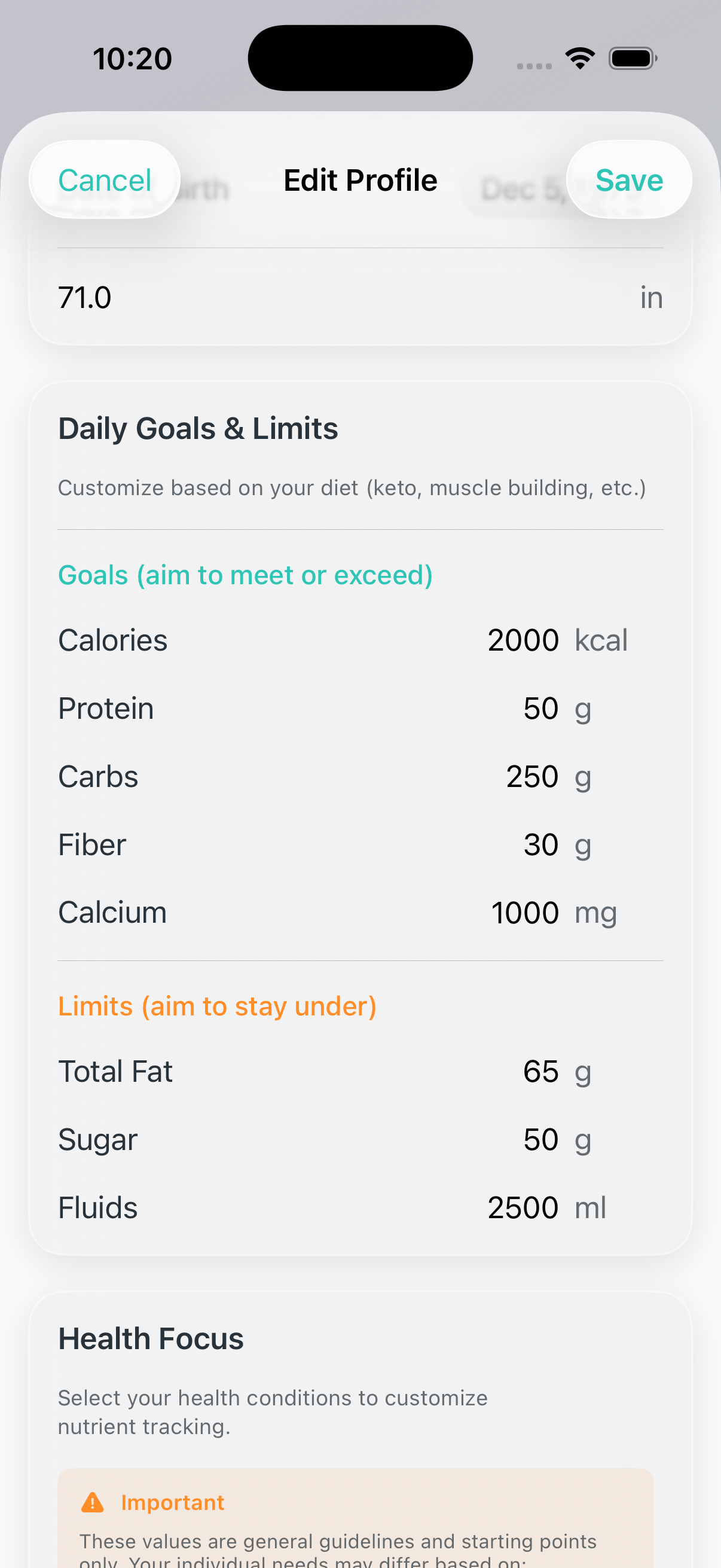
In the Daily Goals & Limits section, adjust your targets:
Goals - Calories, Protein, Carbs, Fiber, Calcium (aim to meet or exceed)
Limits - Total Fat, Sugar, Fluids (aim to stay under)
Tap Save when finished
Understanding Target Types
Different nutrients have different goal types:
Goals (Green progress) - Nutrients you want to reach, like protein and fiber
Limits (Red when exceeded) - Nutrients you want to stay under, like sodium and saturated fat
Health-Specific Limits
If you have a health condition, you can enable special tracking in the Health Focus section of Edit Profile:
Kidney Disease - Adds tracking for sodium, potassium, phosphorus, and fluid limits. You can also specify your CKD stage.
Heart Disease - Adds tracking for saturated fat, cholesterol, and stricter sodium limits
Important: These values are general guidelines and starting points only. Your individual needs may differ based on blood test results, presence of proteinuria, other conditions, and medications. Please consult your doctor, nephrologist, or registered dietitian to discuss personalized limits and goals for your specific situation.
Note: Your health mode affects which nutrients are tracked as goals vs. limits. For example, Kidney Health mode tracks protein as a limit rather than a goal.
Tips for Success
Build a Logging Habit
Set meal reminders - Go to Settings > Notifications to enable reminders for breakfast, lunch, and dinner
Log as you eat - It's easier to remember portions when food is in front of you
Don't stress about perfection - Estimates are fine; consistency matters more than precision
Use Saved Foods
After logging a food, it's automatically saved for quick re-logging
Access your saved foods from the Saved Foods button in Log Food
Long-press any saved food for quick actions like logging or deleting
Create Recipes for Regular Meals
If you make the same meals often, create recipes for them